
A Guide to Pet Cameras: How To Monitor Your Pet When You're Away

In this Article
- 1. Live video streaming
- 2. Two-way audio communication
- 3. Treat dispensing features
- 4. Night vision capabilities
- 5. Motion and sound detection
- 6. Video recording and storage
- 7. Pan, tilt, and zoom functions
- 8. Camera placement and setup
- 9. App features and user interface
- 10. Privacy and security
- Choosing the right camera for your pet
- FAQs
- Shop at PetSmart
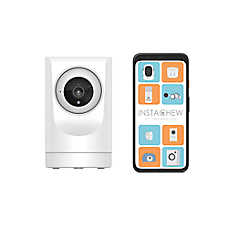
Pet cameras help you stay connected with your pets when you're away from home — whether you share your space with a dog, cat, bird or another small companion animal. These devices stream live video to your smartphone, letting you see what your pup is doing throughout the day. Whether you want to check on a puppy during work hours or make sure your senior cat is comfortable, pet cameras provide peace of mind and a way to interact with your furry friend from anywhere.
Modern pet cameras offer features beyond basic video streaming. Many include two-way audio so you can talk to your animal, treat dispensers for rewards, and motion alerts that notify you when your pet moves. Here's what to consider when choosing the best pet camera for your needs.
1. Live video streaming
The core feature of any pet camera is high-quality video streaming. Look for cameras that offer clear, high-definition video so you can see your pet clearly. Good video quality helps you spot details like whether your dog is actually sleeping or just resting with their eyes open.
Video streaming relies on your home Wi-Fi connection. The camera connects to your network and sends video to your phone through the manufacturer's app. Most cameras let you watch live video anytime from anywhere, as long as you have internet access on your phone. Key video features to look for:
- 1080p or higher resolution for clear images
- Wide-angle lens that captures more of the room
- Smooth streaming without lag or buffering
- Low latency so you see what's happening in real time
2. Two-way audio communication
Two-way audio lets you hear your pet and talk back to them through the camera. Your pet hears your voice from the camera's speaker, which can provide comfort and reassurance. This feature is especially helpful for dogs with separation anxiety or those still adjusting to being alone.
Use two-way audio to:
- Calm your dog during stressful situations
- Give commands or cues if your dog is getting into something they shouldn't
- Simply let your dog hear your voice for comfort
- Practice training commands remotely
Audio quality matters for two-way communication. Clear speakers and microphones ensure your dog can hear you and you can hear them. Some cameras have noise cancellation that filters out background sounds, making it easier to focus on your dog's barks or movements.
3. Treat dispensing features
Treat-dispensing cameras add an interactive element to pet monitoring. These cameras include a compartment that holds dog treats and a mechanism that tosses them out when you press a button on your phone. This feature lets you reward your dog for good behavior or simply surprise them with a snack during the day.
Treat dispensers work best with specific treat sizes and shapes. Check what types of treats are compatible with each camera model. Some cameras work only with small, hard treats, while others can handle various shapes and sizes. Many manufacturers sell specially designed treats that work perfectly with their cameras. Consider these treat dispenser details:
- Capacity for how many treats the compartment holds
- Treat size requirements and compatibility
- Tossing distance to reach different areas of the room
- Easy refill access so you can reload treats quickly
4. Night vision capabilities
Night vision lets you monitor your pet in low-light conditions or during evening hours. Most pet cameras use infrared technology to capture video in the dark. The camera switches automatically to night mode when lighting drops below a certain level.
Night vision is useful for:
- Checking on your dog or cat during nighttime hours
- Monitoring pets in rooms without much natural light
- Seeing what your pet does while you sleep (because don’t we all wonder)
- Identifying nighttime behaviors that might need addressing
The quality of night vision varies between cameras. Some provide clear, detailed images in complete darkness, while others offer basic visibility. If you need to monitor your dog at night regularly, invest in a camera with strong night vision capabilities.
5. Motion and sound detection
Motion and sound detection features alert you when your camera detects movement or noise. You'll get a notification on your phone when your pet becomes active, barks, or moves around. This helps you stay informed without constantly watching the video stream.
These alerts are customizable in most camera apps. You can adjust sensitivity levels to avoid too many notifications or set specific times when you want alerts. Some cameras let you create detection zones, so you only get alerts when movement happens in certain areas. Helpful detection features include:
- Instant push notifications when activity is detected
- Adjustable sensitivity to match your pet's activity level
- Sound detection that identifies barking specifically
- Video clips saved automatically when motion is detected
6. Video recording and storage
Many pet cameras can record video for later viewing. This feature lets you see what happened while you were away or review specific incidents. Recording options vary by camera, with some storing video locally and others using cloud storage.
Storage options include:
- Cloud storage that saves video to secure online servers
- Local storage using SD cards or internal memory
- Continuous recording that captures everything
- Event-based recording triggered by motion or sound
Cloud storage often requires a subscription fee. Basic plans may include limited video history, while premium plans offer longer storage periods. Local storage doesn't have monthly fees but provides less storage capacity and may be lost if the camera is damaged or stolen.
7. Pan, tilt, and zoom functions
Some pet cameras offer pan, tilt, and zoom capabilities that let you control the camera angle remotely. You can move the camera left and right, tilt it up and down, or zoom in for closer views. This feature helps you follow your dog as they move around the room. Motorized cameras can:
- Track your pet's movement automatically
- Cover larger areas without multiple cameras
- Zoom in to see details like facial expressions or small objects
- Return to preset positions you configure
These features cost more than stationary cameras. If your pet stays in a small area or you can position a fixed camera to capture the full space, you may not need pan and tilt functions. For larger rooms or very active pets, these capabilities provide better coverage.
8. Camera placement and setup
Proper placement ensures you get the best view of your pet's favorite spots. Position the camera where it captures the areas your dog uses most often. Consider height, angle, and distance from your dog's usual locations.
Placement tips:
- Place cameras at dog or cat eye level or slightly higher for better perspective
- Avoid backlighting from windows that can create glare
- Secure the camera out of reach if your pet is curious or destructive
- Ensure the camera is near a power outlet or has adequate battery life
- Test Wi-Fi signal strength in the camera's location
Setup usually involves downloading an app, creating an account, and connecting the camera to your Wi-Fi network. Follow the manufacturer's instructions carefully for best results. Test the camera before leaving your dog alone to ensure everything works properly.
9. App features and user interface
The smartphone app is your control center for the pet camera. A well-designed app makes it easy to view video, adjust settings, and interact with your pet. Look for apps with intuitive navigation and reliable performance.
Important app features:
- Quick access to live video from the home screen
- Easy control of treat dispensing, audio, and other interactive features
- Alert customization for motion and sound detection
- Access to recorded video clips
- Multiple user support so family members can access the camera
Read app reviews before buying a camera. User feedback reveals information about app stability, update frequency, and customer support quality. A camera with excellent hardware but a frustrating app won't provide the experience you want.
10. Privacy and security
Security is important for any device that records video in your home. Look for cameras with strong encryption and secure authentication methods. Two-factor authentication adds an extra layer of protection to your account. Security features to verify:
- End-to-end encryption for video streams and stored footage
- Two-factor authentication for account access
- Regular security updates from the manufacturer
- Privacy controls that let you turn off recording when desired
Use strong, unique passwords for your camera account. Change default passwords if the camera comes with one. Keep the camera's firmware updated to get the latest security patches. These practices help protect your privacy and prevent unauthorized access.
Choosing the right camera for your pet
The best pet camera depends on your pet’s needs and your monitoring goals. Dogs with separation anxiety benefit from two-way audio features. Active animals may need cameras with wide-angle views or pan-and-tilt functions. Dogs who love treats enjoy cameras with dispensing capabilities. Consider these factors:
- Your pet's temperament and whether they struggle with being alone
- The size of the space you need to monitor
- Whether you need night vision for evening monitoring
- Your budget for both the camera and potential subscription fees
- How often you'll use interactive features like audio and treats
Start with essential features and add advanced capabilities as needed. Many pet parents find that basic video streaming with two-way audio meets their needs perfectly. Others appreciate the full range of features for maximum interaction and monitoring flexibility.
FAQs
Can multiple people access the same pet camera?
Yes, most pet cameras allow multiple users to access the same camera. You can invite family members to view the video stream and interact with your dog. This feature is helpful when multiple people share pet care responsibilities.
How much internet bandwidth does a pet camera use?
Pet cameras typically use minimal bandwidth when not actively streaming. During live viewing, they use similar bandwidth to streaming video services. Most home internet connections easily handle pet camera usage without affecting other devices or activities.
Will the camera scare my dog?
Most dogs adjust to cameras quickly and learn to ignore them. Introduce the camera gradually by letting your dog investigate it while you're home. Keep training treats nearby to create positive associations. Some dogs may startle initially when hearing your voice from the speaker, but they typically adapt within a few days.
Do I need a subscription for my pet camera?
Not all pet cameras require subscriptions. Many offer basic features like live streaming without monthly fees. Subscriptions typically provide benefits like cloud storage, extended video history, and advanced alerts. Compare what's included at no cost versus paid plans.
Can I use a pet camera outdoors?
Most pet cameras are designed for indoor use only. If you need outdoor monitoring, look specifically for weatherproof cameras rated for outdoor conditions. These cameras can handle temperature changes, moisture, and direct sunlight better than indoor models.
Shop at PetSmart
Need other supplies while you're shopping for pet cameras? PetSmart also carries dog food, dog beds, dog treats, leashes and harnesses, flea and tick meds and more. Explore PetSmart's Dog Shop to find everything your pup needs, all in one place.
PetSmart also offers services such as dog grooming services, expert dog training, safe and comfortable PetsHotel stays, and Doggie Day Camp for your pup to play and socialize. Services are available in select locations. Check your local PetSmart to see what's offered near you.
Information in this article is not intended to diagnose, treat or cure your pet and is not a substitute for veterinary care provided by a licensed veterinarian. For any medical or health-related advice concerning the care and treatment of your pet, contact your veterinarian.
In this Article
- 1. Live video streaming
- 2. Two-way audio communication
- 3. Treat dispensing features
- 4. Night vision capabilities
- 5. Motion and sound detection
- 6. Video recording and storage
- 7. Pan, tilt, and zoom functions
- 8. Camera placement and setup
- 9. App features and user interface
- 10. Privacy and security
- Choosing the right camera for your pet
- FAQs
- Shop at PetSmart